
1. What Is a Minecraft Seed Map Planner?
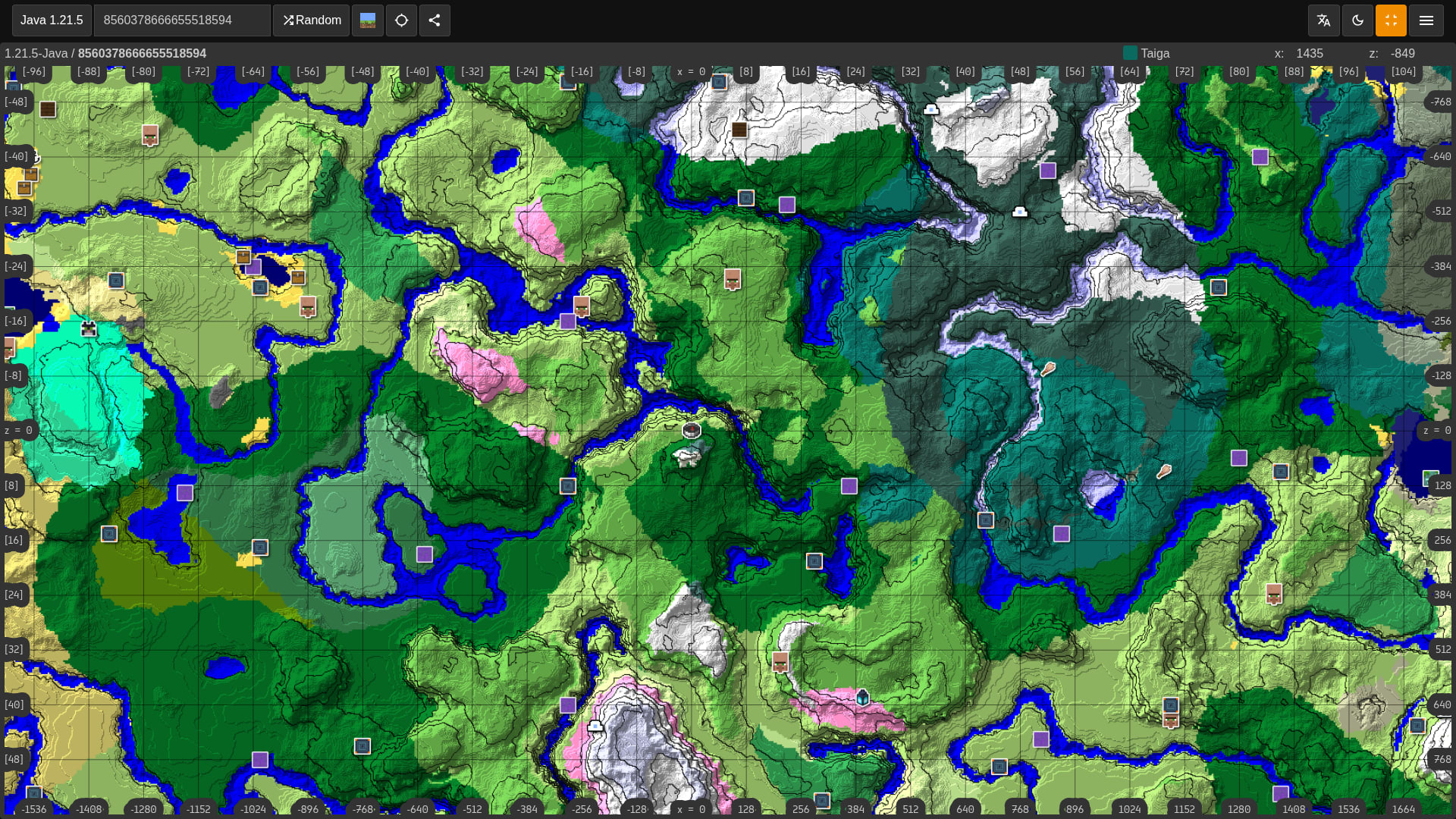
A Minecraft seed map planner is a browser-based planning page for keeping a seed, edition, version, coordinate notes, and related finder links together before you explore in-game.
Every Minecraft world is defined by a single number — the seed — that the generator uses as a starting point to deterministically place every mountain, river, biome, and structure. Because edition and version matter, a good planning workflow keeps the seed code, coordinates, screenshots, related finder pages, and in-game checks together before you commit to a route or base.
That matters practically. On a speedrun, you can confirm the stronghold is within range before committing to a world. For a build server, you can scout a suitable mountain range and copy the coordinates before anyone else loads in. For a survival playthrough, you can check whether the desert biome you're heading toward actually has a temple — instead of walking for twenty minutes to find out it doesn't.
Keep the seed, edition, version, and route notes together before you spend time exploring in-game.
Scout entire worlds without loading Minecraft. Works in any browser tab, any device.
Full parity support for both editions, updated with every major snapshot and preview build.
Zoom, pan, and read structure coordinates on your phone while playing on console simultaneously.
2. How Minecraft World Seeds Actually Work
Minecraft uses a pseudo-random number generator (PRNG) to construct landscapes. Because computers can't generate truly random numbers, they use complex algorithms that produce a predictable sequence from a single starting value — the seed.
String Seeds vs. Numeric Seeds
If you type text into the seed field (like "Minesite"),
Java's string hashing algorithm converts it to a 32-bit signed
integer. Pure numbers bypass hashing and use the full
64-bit integer space — that's 2⁶⁴ unique possible
worlds.
Java & Bedrock Seed Parity
Since Minecraft 1.18, Mojang achieved near-perfect seed parity. Enter the same numeric seed on Java or Bedrock and you'll get the same mountains, biomes, and ocean layout — only minor block-level differences remain.
Pro tip: Always share seeds as numbers when posting across editions. Text seeds hash differently on Java vs. Bedrock and produce completely different worlds.
3. The Cave Congruence: Underground Generation
Minecraft's terrain engine uses the full 64-bit seed for the surface, but underground caves, ravines, mineshafts, and slime chunks use a legacy 48-bit Java Random implementation.
Technical builders use this to find identical slime-chunk grids across
different worlds: S_new = S + k · 2⁴⁸ — where k is any
integer within the signed 64-bit range.
4. Why Legacy Seed Viewers Fail
Old mappers use server-side image rendering. Every zoom or pan stalls the page while a remote server processes new chunks — sometimes 3–5 seconds per tile.
Non-responsive interfaces break completely at mobile widths — impossible to check coordinates on your phone while playing on console.
Most legacy mappers update months after major drops — they don't reflect the latest biome generation rules, showing phantom structures that don't exist in-game.
Faulty coordinate tooltips display villages or strongholds where they genuinely don't generate — wasting hours of in-game searching.
The Planning Advantage
Minesite's seed planner focuses on a simpler workflow: keep the seed, edition, version, and target structures visible, then compare those details with tested seed pages and route notes.
The most useful seed checks start with matching the exact edition and version. Many wrong coordinates come from using good seed notes against the wrong world-generation rules.
5. Map Seeds by Exact Java or Bedrock Version
Minecraft's 2026 release numbering makes version selection more important, not less. A seed map is only useful when the seed, edition, and version match the world you are actually creating. Terrain can remain similar across nearby releases, but structures, biomes, and generated features can shift after updates.
Choose Java or Bedrock before judging coordinates. Modern seeds can share broad terrain, but structure placement can still differ between editions.
Select the release that matches your save. A coordinate tested in one version should be rechecked before you build a long-term base around it.
Existing worlds keep already-generated chunks. New terrain and structures only appear when you explore chunks that were not generated in an older version.
Save the seed, edition, version, dimension, and coordinates together so you can retest a route later instead of trusting a screenshot with missing context.
Underground Y-Level Reference
Important: new terrain generation only appears in newly explored chunks. Pre-existing worlds will not retroactively change already-generated areas, so retest routes after updating and explore outward for fresh generation.
6. Hand-Picked Seeds to Map Right Now
These five seeds are verified for Java 26.1 / Bedrock 26.20 and carry over identically when 26.2 / 26.30 drop. Paste any code into Minesite's seed map to instantly see biomes, structures, and coordinates. Click any seed code to copy it.
| Seed Code | Key Feature | Coords | Structures | Edition |
|---|---|---|---|---|
| -7775094310068025774 | Hollow Mountain & Lush Caves | 120, −240 | Ancient City, Mineshaft | Java & Bedrock |
| -1106759604738884840 | Giant Pale Garden | −450, 800 | Pale Mansion, Village | Java & Bedrock |
| 5101553622029575588 | Savanna Plateau | 240, 64 | Village, Ruined Portal | Java & Bedrock |
| -8631174543717435159 | Giant Treeless Desert | −80, 120 | Desert Pyramid, Village | Java & Bedrock |
| 7749012223532925400 | Mooshroom Island at Spawn | 0, 0 | Large Spawn Island | Java & Bedrock |

7. Step-by-Step: Map Your World in Seconds
Works on PC, mobile, or console — from in-game seed to fully mapped world in under two minutes.
Java: Press T, type
/seed, Enter — click the number to copy to
clipboard.
Bedrock: Pause → Settings →
Advanced → copy the Seed field.
Go to minesite.online/seed-map in any browser — desktop, tablet, or phone. No account, no install.
Paste your seed, select your version (e.g.
Java 26.2 or Bedrock 26.30), and
choose your dimension — Overworld, Nether, or The End.
Use the sidebar to toggle: Strongholds, Villages, Trial Chambers, Slime Chunks, Ocean Monuments, Ancient Cities — all with exact X/Z coordinates.
Drag the elevation slider below Y = 60 to switch
from surface biomes to a subterranean heat-map — showing cave
boundaries, Deep Dark zones, and slime chunk grids with
version-specific accuracy.
8. Key Structures — What to Look For
Contains the End Portal frame. Knowing the exact coordinates saves hours of Eye of Ender searching — essential for speedrunners.
Your first trading hub. A blacksmith village at spawn gives iron armor, food, and a massive head-start on Day 1.
Best source of heavy armor trims and the Mace weapon. Find them before you need them rather than stumbling through caves.
Slimes spawn below Y=40 in specific chunks per your seed. Know them in advance and build a slime farm with zero guesswork.
The only source of Sponge blocks. Mark them early and fast-travel once you're geared up enough to fight Guardians.
Hidden in the Deep Dark, yielding Echo Shards and exclusive loot. A seed map shows exactly where to dig — and whether a Warden is likely waiting.
10. Mapping Multiplayer Servers
Using a seed map on a single-player world is easy because you have
access to the /seed command. However, if you are playing
on a multiplayer server or a Realm where you do not have operator
permissions, the /seed command is usually disabled. So,
how do you map your multiplayer world?
Use Seeds You Own or Have Permission to Use
For a server you own or administer, use the normal seed controls: Java
operators can run /seed, and Bedrock world owners can
find the seed in World Settings. If you are playing on someone else's
server, ask the owner or admin team before mapping the world.
Minesite's viewer is designed for legitimate planning, backups, and
shared community seeds, not for bypassing a server's privacy settings.
Work From Approved Backups
If the server team gives you a world backup or published seed, open it locally, confirm the Minecraft version and edition, then enter the seed into the Minesite Seed Map Planner. This keeps the map accurate and respects the rules of the world you are playing on.
11. Performance Tweaks for Low-End Devices
Large map renderers can be computationally intensive on older mobile phones or low-end laptops. Minesite's planning page stays light so you can keep seed notes open while playing.
- Disable 3D Terrain: If the viewer is lagging, switch from the 3D topographic view to the flat 2D map. This significantly reduces GPU load.
- Reduce the Render Distance: Do not try to render a 20k radius immediately. Start with a 2,000 block radius around spawn. As you pan the map, the viewer will dynamically load new chunks in the background.
- Toggle Off Minor Structures: The map calculates the position of thousands of ruined portals, buried treasures, and shipwrecks. If you are only looking for a Mushroom Island or a Stronghold, turn off all the other structure toggles. This prevents the browser from having to render thousands of individual SVG icons, drastically improving panning smoothness.
Before you travel: Once you have mapped the route to the nearest Stronghold, save the coordinates and check your gear before leaving spawn. You can also use the Minesite Skin Editor to design a fresh, high-definition skin before you take on the Ender Dragon.
9. Look the Part — Design Your Avatar
Once you've scouted your perfect new biome base location, Minesite's free skin editor lets you build a custom avatar to match your build's aesthetic. No account required, fully in-browser.
Skin Editor includes: Live 3D preview with six rotation angles · Steve and Alex model support (4px & 3px arms) · Dual-layer editing for base skin and clothing overlay · Download as a 64×64 PNG ready to upload directly into Minecraft.
READY TO MAP YOUR SEED?
Enter any seed into Minesite's free seed map planner — instant results, no account, no download. Fully updated for Java 26.2 and Bedrock 26.30 with new biome support.